You Can Be Logged In and Still Attacked — How CSRF Actually Works
What is CSRF (Cross‑Site Request Forgery)? Complete 2026 Guide with Real Banking Attack Examples, Code Walkthroughs & CSRF Protection Best Practices
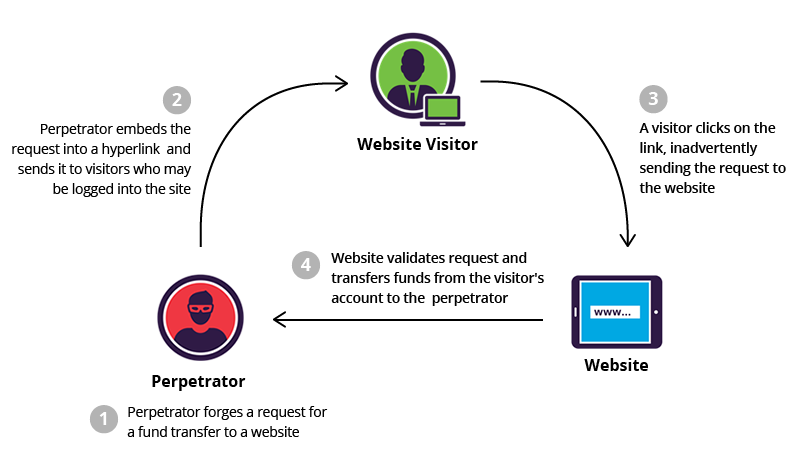
Most developers hear “use CSRF tokens” but don’t understand why or how the attack actually works. This post explains CSRF in web security from the attacker’s perspective — exactly how they steal money from your banking app — then shows the specific defenses that stop each technique, including real code examples and modern best practices from OWASP‑style guides.
If you want to also learn about injection‑style attacks, you can read my guide on XSS attacks next.
- What is CSRF (Cross‑Site Request Forgery) in 2026?
- Real banking transfer CSRF attack with code example
- CSRF attack examples in real‑world apps
- CSRF tokens — how they actually stop CSRF
- SameSite cookies — modern browser‑level protection
- Express.js CSRF protection walkthrough (Node.js)
- CSRF vs XSS — key differences and defenses
- Your complete CSRF protection checklist for 2026
What is CSRF (Cross‑Site Request Forgery) in Web Security?
CSRF tricks your logged‑in browser into making requests to sites where you’re authenticated. Your session cookie goes with every request automatically — so the target site thinks you made the request, even though it was triggered from a malicious page.
Simple CSRF scenario (shopping app)
A user is logged into an online store and has items in their cart. An attacker tricks them to visit a malicious page that automatically sends a hidden form to /add-to-cart or /checkout with pre‑filled values. Because the browser sends the session cookie, the order is created without the user noticing.
Real Banking CSRF Attack Example (with HTML Code)
You’re logged into bank.com. You visit evil.com (maybe a phishing link). Their page contains a hidden form that auto‑submits a money transfer.
<!-- evil.com/steal.html -->
<form action="https://bank.com/transfer" method="POST" id="evil">
  <input type="hidden" name="amount" value="5000">
  <input type="hidden" name="to" value="attacker_account">
</form>
<script>document.getElementById('evil').submit();</script>
Your browser sends the transfer request with your session cookie. If the bank has no CSRF protection, the $5000 transfer is processed instantly. This is the classic CSRF banking attack pattern seen in real vulnerabilities like ING Direct and similar platforms.
3 Ways Attackers Trigger CSRF in Real Apps
- Auto‑submit form: Hidden form + JavaScript
submit()(as shown above). Easy to embed in social‑media or phishing pages. - Image trick:
<img src="https://bank.com/transfer?amount=5000&to=attacker">— forces a GET request when the image is loaded. Works if the app allows state‑changing actions over GET. - Link click: “Click for free gift!” or “Check your prize” styled button that submits a form behind the scenes, often using
buttondisguised as a simple link.
These tricks rely on the browser’s automatic behavior: sending cookies and credentials for any request to the target domain, even if it was triggered from a third‑party site.
How CSRF Tokens Actually Stop the Attack
CSRF tokens (also called “synchronizer tokens”) are the primary defense against CSRF. Every form gets a unique, unpredictable token that only the server and your legitimate page know.
POST /transfer
csrf_token=abc123XYZ&amount=100&to=friend
Token pattern in the HTML form
<form action="/transfer" method="POST">
  <input type="hidden" name="csrf_token" value="abc123XYZ">
  <input type="text" name="amount" value="100">
  <input type="text" name="to" value="friend">
  <button type="submit">Transfer</button>
</form>csrf_token match the session token? No match = reject request. This pattern is recommended by OWASP and modern web security guides.
SameSite Cookies – Browser‑Level Protection Against CSRF
Servers can tell browsers not to send cookies on cross‑site requests, weakening CSRF attacks.
Set-Cookie: session=abc123; SameSite=Strict; SecureSameSite=Strict means cookies are not sent on cross‑site requests at all. SameSite=Lax relaxes this but still blocks many dangerous scenarios. Combined with HTTPS‑only cookies, this dramatically reduces the CSRF surface.
Example in Node.js / Express
const csrf = require('csurf');
const express = require('express');
const cookieParser = require('cookie-parser');

const app = express();
app.use(cookieParser());

const csrfProtection = csrf({ cookie: true });

app.get('/form', csrfProtection, (req, res) => {
  res.send(`
    <form action="/process" method="POST">
      <input type="hidden" name="_csrf" value="${req.csrfToken()}">
      <button type="submit">Submit</button>
    </form>
  `);
});

app.post('/process', csrfProtection, (req, res) => {
  res.send('Data processed safely');
});

app.listen(3000);
CSRF vs XSS — Key Differences
- CSRF: Tricks user into sending a request
- XSS: Executes malicious script in browser
- CSRF needs authentication, XSS does not
- CSRF uses victim session, XSS steals session
CSRF Protection Checklist (2026)
- Use CSRF tokens on all sensitive forms
- Enable SameSite cookies (Strict or Lax)
- Use HTTPS everywhere
- Avoid GET requests for sensitive actions
- Implement proper session management
- Use frameworks with built-in CSRF protection
Comments
Post a Comment